
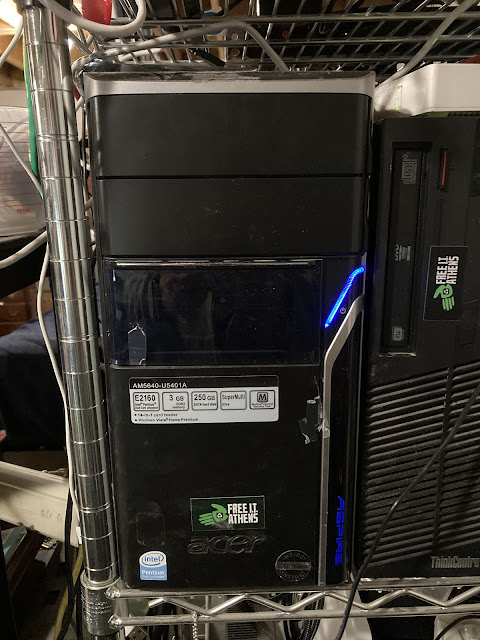
The storage server was originally going to be based on FreeNAS. However, it turned out that the minimum requirements have grown quite a bit over the years, and it’s become much more than just a NAS device. Since many of the features it provides are going to be unused in a simple lab setup like this, I decided to build a simple NFS server using Debian Buster. I chose NFS because of the simplicity of the setup. For people looking for a GUI to manage the server, I would recommend Webmin. Since this server should never have anybody connecting to it from the outside world, it should be OK with the base Webmin install. I would be careful if the server has any public addresses on it. There are ways to make it reasonably secure to connect to, but that is beyond this post—maybe a future blog post.The storage server is a Acer Aspire m5640 I bought from Free IT Athens for $15. I bought an additional 3 250GB disks for $36.
Hardware
- Intel Pentium E2160 @ 1.80GHz
- Nvidia MCP73 Ethernet
- DGE-528T Gigabit Ethernet Adapter
- 4G – DDR2 PC2-6400
- software raid
- ST3250620NS
- 3 xWDC WD2503ABYX
Software
- debian bookworm
- nfs-kernel-server
- nfs-common
Additional Configs
Besides the normal installation for the server that is covered very well in other locations, there are a few configurations beyond the base install worth mentioning. The 3 disks were assembled into a software RAID-5. The RAID-5 was then partitioned into a root partition, a swap partition, and a Linux LVM partition that will be used as /exports/data on the server.
Disk /dev/md0: 698.11 GiB, 749589233664 bytes, 1464041472 sectors
Units: sectors of 1 * 512 = 512 bytes
Sector size (logical/physical): 512 bytes / 512 bytes
I/O size (minimum/optimal): 524288 bytes / 1572864 bytes
Disklabel type: dos
Disk identifier: 0x5a6ece79
Device   Boot   Start   End   Sectors   Size   Id   Type
/dev/md0p1 *     63   9767519 9767457   4.7G   83   Linux
/dev/md0p2   967916250 976013009 8096760 3.9G   82   Linux swap / Solaris
/dev/md0p3   9767520 967916249 958148730 456.9G 8e   Linux LVM

I chose LVM on the export partition because of the flexibility to add additional raids without reworking everything.
/etc/exports
/exports/data 192.168.0.0/255.255.0.0(no_subtree_check,rw,no_root_squash,sync)

/exports/data is only exported to the SAN network(which is not routed to any other network)
/etc/network/interfaces
# The loopback network interface
auto lo
 iface lo inet loopback
auto enp1s5
iface enp1s5 inet static
  address 192.168.199.254
  netmask 255.255.255.0
  broadcast 192.168.5.255
  network 192.168.199.0
  mtu 7000

auto enp0s15
iface enp0s15 inet static
  address 192.168.200.254
  netmask 255.255.255.0
  broadcast 192.168.1.255
  network 192.168.200.0
  gateway 192.168.200.1
I also modified the network configuration to set the MTU for the storage area network to 7000 on the DGE-528T NIC on the SAN network.